
How to Automatically Localize Your Website Using an IP Geolocation API
Most websites deal with visitor location in one of two ways. Either they stop you with a pop-up asking, "Where are you from?" like a suspicious neighbour. Or they don't ask at all and just show everyone the same USD prices and English text no matter where in the world they're browsing from. Neither is great. Both quietly cost you customers.
Website localization through an IP geolocation API means your site automatically figures out a visitor's country, language, and currency the moment they land and adjusts the page before they even notice anything happened. No dropdown menus. No pop-ups. No guessing games.
This guide covers why the "ask the visitor" approach backfires, what you can actually automate instead, and how to set it up step by step.
Why Pop-Ups Asking for Location Hurt Conversions
Picture this: you land on a site, excited to check something out, and before you see anything useful, a box pops up asking you to confirm your country. That's friction. And friction before someone sees any value is a great way to lose them.
Here's what goes wrong with pop-ups:
- They add an extra click before the visitor can do anything useful
- Mobile users bounce off these interruptions especially fast; nobody wants to tap "confirm" on their phone before they've even scrolled
- They put the work on the visitor, when the browser already handed you enough clues to get it right
- They make the site feel unfinished, like it's waiting on you to fill in the blanks
Teams often add these pop-ups because it feels "safer" to ask instead of assume. But visitors rarely read it that way. To them, it just feels like one more form standing between them and what they actually came for.
What You Can Actually Detect and Adapt Automatically
A good IP geolocation API doesn't just spit out a country name and call it a day. It gives you enough real detail to genuinely personalize the visit. Here's what usually becomes possible:
- Language: show the visitor's regional language automatically, no language switcher buried in the header
- Currency: display local pricing (EUR, GBP, PKR, whatever fits) instead of defaulting everyone to USD
- Region-specific redirects: send visitors straight to the right subdomain or folder, like /uk/ or /de/, without them typing anything
- Content that actually applies to them: adjust shipping estimates, show region-specific offers, or only display legal notices (like cookie banners) where they're actually required
None of this needs the visitor to lift a finger. Done well, most people won't even notice it happened. They'll just feel like the site somehow "gets" them.
How This Actually Works Behind the Scenes
Here's the short version, no engineering degree required. When someone's browser asks your server for a page, their IP address rides along with that request. An IP geolocation API takes that address, checks it against a location database, and hands back the country, currency, timezone, and language almost instantly, usually in well under a second.
Timing matters here more than people expect. This lookup needs to happen early, ideally on the server, before the page finishes loading. Otherwise visitors briefly see the default (usually English, USD) version flash on screen, then watch it swap to the localized one a beat later. That little flicker undoes a lot of the smoothness you were going for.
How to Set It Up, Step by Step
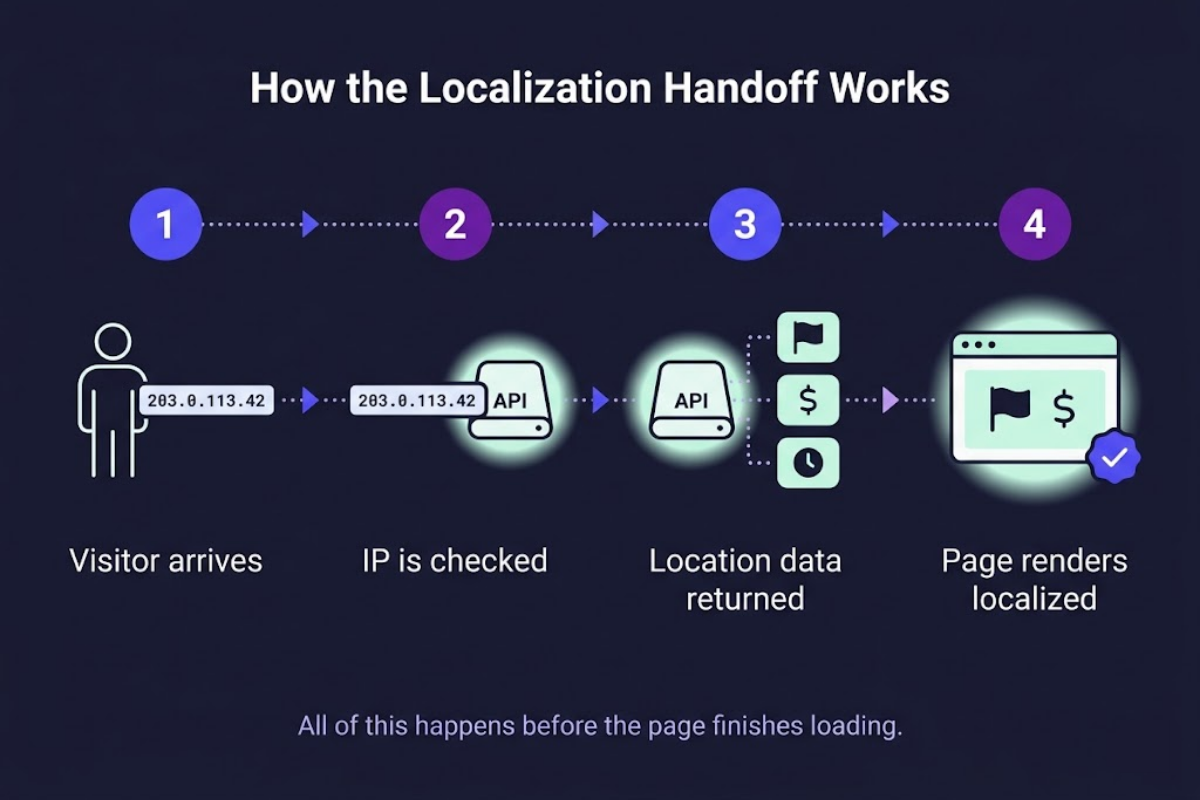
Step 1: Grab the visitor's IP address. Most web frameworks already expose this through request headers on the server side, so there's nothing extra to build here.
Step 2: Send that IP to a geolocation API. Query an IP geolocation API and ask only for what you actually need, like country code, currency, and language, instead of pulling the entire response every single time. Smaller requests, faster responses.
Step 3: Match the response to your site's settings. Take the country code you get back and match it to your existing language and currency setup. Most frameworks already handle this kind of mapping through built-in localization tools; you're just feeding them the right input automatically instead of waiting for someone to pick from a dropdown.
Step 4: Show the localized version, or redirect. Depending on how your site's built, either render the localized content right away or redirect the visitor to their regional page. Either way, still leave a simple, visible way for them to switch manually. More on why in a minute.
What a Real Response Looks Like
From one response like this, you already have everything you need: the right currency symbol, a language to show, and even the correct time format, all without asking the visitor a single question.
Mistakes Worth Avoiding
That last one tends to sneak up on people. It rarely shows up during local testing, since everything feels instant on your own machine, and only becomes obvious once real traffic hits and things start feeling sluggish.
FAQs
Does this still work for someone using a VPN?
Not really, and that's worth knowing upfront. A VPN routes traffic through a server somewhere else, so the API detects wherever that server is, not the visitor's actual location. This is exactly why keeping a simple manual override matters, even with automatic detection running in the background.
Is IP geolocation accurate enough to trust for currency?
For country-level decisions, yes, it's generally solid, and country is really all you need to pick a currency. City-level accuracy can wander a bit more, but for language and currency purposes, you rarely need to be that precise anyway.
Do I need to ask for consent to localize this way?
Usually not. Showing a different language or currency based on IP typically isn't considered tracking, since nothing personal is being stored long-term. That said, if you're also running analytics or ad tracking alongside it, check what your applicable privacy laws (like GDPR) require for that separate piece.
Wrapping Up
Getting localization perfect for every single visitor isn't realistic, VPNs and edge cases will always slip through. But getting it right by default for the vast majority of people, while still leaving an easy way out for the rest, is very doable. Do it well, and most visitors won't even clock that anything special happened. The site will just feel like it was built with them in mind, from the very first second.