
How to Secure a Spring Boot REST API: Roles, Endpoints & JWT
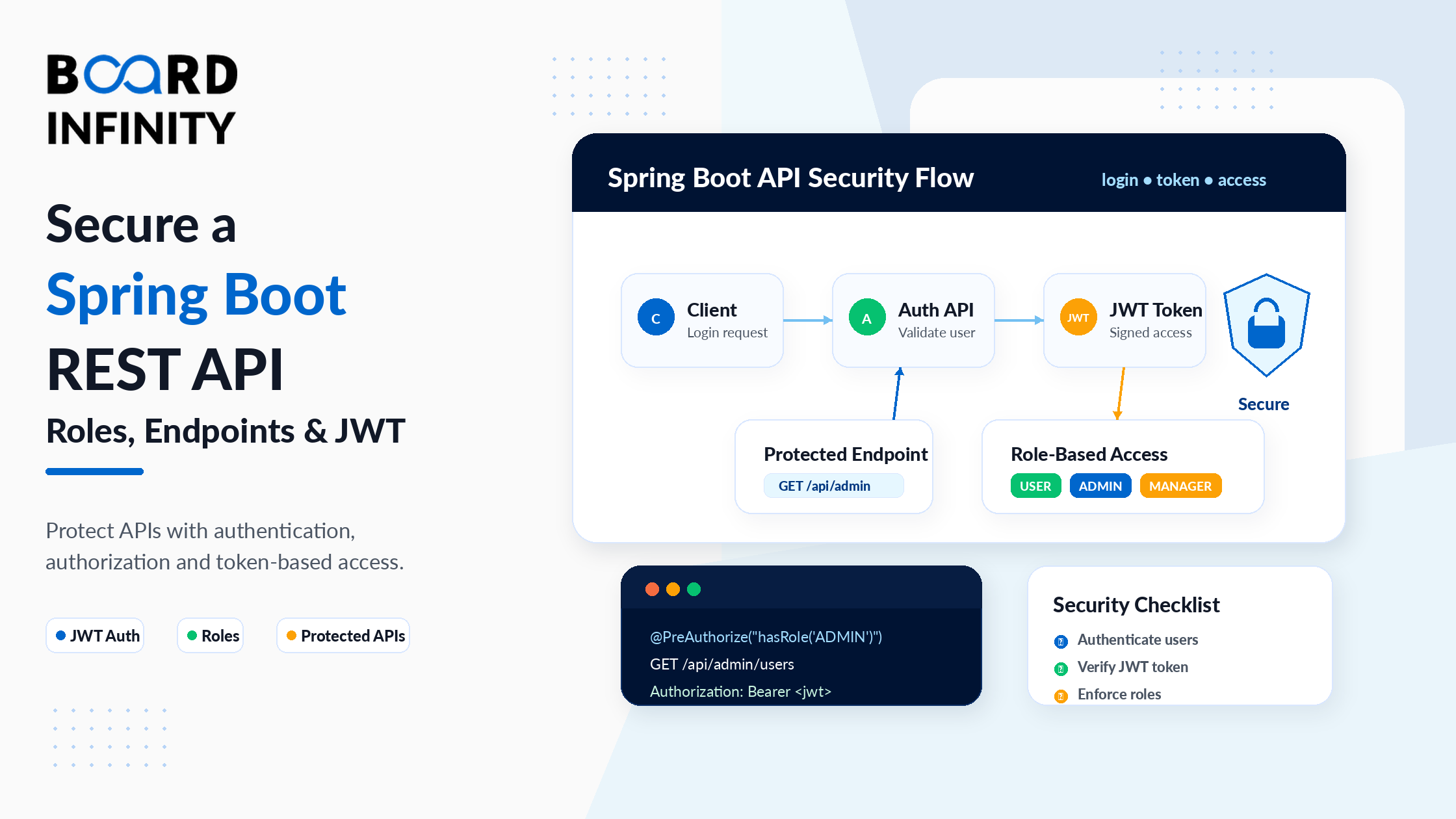
Shipping a Spring Boot REST API without security is shipping a broken product. Every endpoint that reads, writes, or deletes data is accessible to anyone who can reach your server. No authentication means no way to know who is making requests. No authorization means no way to restrict what they can do. In production, this is not a missing feature - it is a critical vulnerability.
Spring Security is the standard solution for Spring Boot API security, and Spring Security 6 (introduced with Spring Boot 3) makes the implementation cleaner than ever. But it has a reputation for complexity - and for good reason. The filter chain, UserDetailsService, BCryptPasswordEncoder, SecurityFilterChain, JWT tokens, and @PreAuthorize all need to work together correctly. A single misconfiguration and everything either locks up or stays wide open.
This guide cuts through the complexity. It covers every security layer your REST API needs - from the Spring Security filter chain architecture through password encoding, role-based route protection, complete JWT authentication, and method-level access control. Every section builds the same production-ready API, so by the end you have a coherent, working security implementation - not a collection of disconnected snippets. For a deeper foundation on Spring Security's Java underpinnings, Board Infinity's guides on OOP concepts in Java and multiple inheritance and Java interfaces are ideal prerequisites - Spring Security's entire architecture is built on interface implementation and polymorphism.
Who This Guide Is For
This guide is for you if you:
- Have a working Spring Boot REST API and need to add security to it
- Understand Spring Boot basics (controllers, services, JPA) but haven't implemented Spring Security yet
- Have added Spring Security and found all endpoints locked or all open - and need to understand why
- Want a complete, production-quality security implementation with JWT and roles
- Want to solidify the Java fundamentals that power Spring Security - Board Infinity's core Java concepts guide covers the Java foundation that makes Spring Security's annotation-driven, interface-based architecture make sense
1. Spring Security Architecture: Filters, Authentication & Authorization
Before writing a single line of security configuration, understand the architecture - otherwise the code won't make sense.
Spring Security works as a chain of servlet filters that intercepts every HTTP request before it reaches your controllers. The filters run in a specific order, and each filter decides whether to process the request, reject it with a 401/403, or pass it to the next filter.
The two core security concepts are authentication (who are you?) and authorization (what are you allowed to do?). Spring Security handles both, in that order. A request must first be authenticated before authorization rules are applied. Understanding how Java's servlet architecture underpins this filter chain is covered in Board Infinity's guide on servlets in Java - Spring Security's filter chain is a direct extension of the Java servlet filter model, and understanding servlets makes the OncePerRequestFilter pattern in JwtAuthFilter immediately intuitive.
| Filter / Component | What It Does | Where You Interact With It |
|---|---|---|
SecurityFilterChain |
Defines route-level security rules for all requests | @Bean SecurityFilterChain in your config class |
UsernamePasswordAuthenticationFilter |
Handles form-based login (not used in JWT REST APIs) | Your JwtAuthFilter is added before this |
JwtAuthFilter |
Custom filter: validates JWT on every request | You write this as OncePerRequestFilter |
UserDetailsService |
Loads user by username from your database | You implement this interface in your service layer |
SecurityContextHolder |
Stores the authenticated user for the current request | Your filter sets auth here; controllers read from here |
AuthenticationManager |
Validates credentials (username + password) | Your login endpoint calls this to verify credentials |
The moment you add spring-boot-starter-security to your project, Spring Security auto-configures a default SecurityFilterChain that requires authentication for every request. Every endpoint returns 401 until you configure your own SecurityFilterChain @Bean. This is intentional - Spring Security is "secure by default." Your job is to explicitly declare which routes are public.
2. Password Encoding with BCryptPasswordEncoder
Never store plain-text passwords in your database. This is not optional - it is the minimum security standard for any application that handles user authentication. Spring Security provides BCryptPasswordEncoder, which uses the BCrypt hashing algorithm to store passwords as irreversible hashes.
BCrypt is designed to be slow - it incorporates a configurable "cost factor" that makes brute-force attacks computationally expensive. Unlike MD5 or SHA-256, BCrypt is specifically designed for password hashing, not general-purpose hashing. The encapsulation principle that protects passwords in the User entity - keeping the password field private with no getPassword() getter exposed to the outside world - is the exact pattern covered in Board Infinity's guide on abstraction vs encapsulation in Java. Proper encapsulation is not just good OOP practice - it's a security requirement when dealing with sensitive user data.
// Register PasswordEncoder as a Spring bean
@Configuration
public class SecurityConfig {
@Bean
public PasswordEncoder passwordEncoder() {
    return new BCryptPasswordEncoder(); // default strength = 10
    // new BCryptPasswordEncoder(12) - higher strength, slower, more secure
}
}
// Using it in your registration service
@Service
public class UserService {
private final UserRepository   userRepository;
private final PasswordEncoder  passwordEncoder;

public UserService(UserRepository ur, PasswordEncoder pe) {
    this.userRepository  = ur;
    this.passwordEncoder = pe;
}

public User register(String email, String rawPassword) {
    if (userRepository.existsByEmail(email)) {
        throw new EmailAlreadyExistsException(email);
    }

    User user = new User();
    user.setEmail(email);
    user.setPassword(passwordEncoder.encode(rawPassword)); // NEVER store raw
    user.setRole(Role.ROLE_USER);
    return userRepository.save(user);
}

// Spring Security calls matches() during authentication - you don't call this
// passwordEncoder.matches(rawPassword, storedHash) returns true/false
}
BCrypt hashes are salted - the same password produces a different hash every time. "password123" might hash to $2a$10$abc... on one call and $2a$10$xyz... on the next. You can't compare hashes with equals(). Always use passwordEncoder.matches(rawPassword, storedHash) which handles the salt comparison correctly. Spring Security's AuthenticationManager calls this for you automatically during login.
3. Defining Users, Roles & Authorities in the Database
A production-grade security implementation stores users and their roles in a database - not hardcoded in configuration. This lets you manage users dynamically, assign different roles, and revoke access without redeploying.
Spring Security uses UserDetails (interface) and UserDetailsService (interface) to decouple your user model from Spring Security's authentication mechanism. You implement these interfaces using your own User entity. The interface implementation pattern here - where UserDetailsServiceImpl implements UserDetailsService - is a direct application of the abstraction principle. Board Infinity's guide on abstraction in Java explains precisely why Spring Security is designed around interfaces rather than concrete classes: it allows you to provide any implementation (database, LDAP, in-memory) without Spring Security knowing or caring about the details. The Java Comparator interface guide also provides useful context on how Java interfaces define behavioral contracts - the same pattern UserDetailsService uses to define the loading contract.
// Role enum - defines available roles in the system
public enum Role {
    ROLE_USER,    // standard authenticated user
    ROLE_ADMIN,   // full administrative access
    ROLE_MANAGER  // intermediate access level
}
// User entity - maps to "users" table
@Entity
@Table(name = "users")
public class User {
@Id
@GeneratedValue(strategy = GenerationType.IDENTITY)
private Long   id;

@Column(unique = true, nullable = false)
private String email;

@Column(nullable = false)
private String password; // BCrypt hash - never plain text

@Enumerated(EnumType.STRING)
@Column(nullable = false)
private Role   role;

@Column(nullable = false)
private boolean enabled = true; // allows account deactivation

// getters, setters, constructors...
}
// UserDetailsService - bridges your User entity and Spring Security
@Service
public class UserDetailsServiceImpl implements UserDetailsService {
private final UserRepository userRepository;

public UserDetailsServiceImpl(UserRepository userRepository) {
    this.userRepository = userRepository;
}

@Override
public UserDetails loadUserByUsername(String email)
        throws UsernameNotFoundException {

    User user = userRepository.findByEmail(email)
        .orElseThrow(() ->
            new UsernameNotFoundException("User not found: " + email));

    // Convert your User entity to Spring Security's UserDetails
    return org.springframework.security.core.userdetails.User
        .withUsername(user.getEmail())
        .password(user.getPassword())        // BCrypt hash from DB
        .roles(user.getRole().name()
            .replace("ROLE_", ""))           // Spring adds ROLE_ prefix back
        .accountExpired(false)
        .accountLocked(false)
        .credentialsExpired(false)
        .disabled(!user.isEnabled())
        .build();
}
}
4. Protecting Routes: permitAll() vs hasRole()
The SecurityFilterChain is where you declare which URLs are publicly accessible and which require authentication or specific roles. The order of rules matters - Spring Security evaluates them from top to bottom and applies the first match.
The role-based access control in SecurityFilterChain - checking ROLE_ADMIN, ROLE_USER, ROLE_MANAGER - relies on Java's Set of GrantedAuthority objects internally. Understanding how sets handle role collections (no duplicates, efficient lookup) is covered in Board Infinity's guide on HashSet in Java. Spring Security uses Set<GrantedAuthority> specifically because roles are unique - a user cannot have duplicate authorities - which is exactly the semantic guarantee a Set provides. The access modifiers in Java guide is also relevant here: understanding private, protected, and public access control at the Java level builds the mental model for thinking about access control at the API level.
@Configuration
@EnableWebSecurity
@EnableMethodSecurity // enables @PreAuthorize on methods
public class SecurityConfig {
private final JwtAuthFilter          jwtAuthFilter;
private final UserDetailsServiceImpl  userDetailsService;

public SecurityConfig(JwtAuthFilter jwtFilter,
                       UserDetailsServiceImpl uds) {
    this.jwtAuthFilter     = jwtFilter;
    this.userDetailsService = uds;
}

@Bean
public SecurityFilterChain securityFilterChain(HttpSecurity http)
        throws Exception {

    return http
        // Disable CSRF - REST APIs use JWT tokens, not cookies
        .csrf(csrf -> csrf.disable())

        // Stateless - no sessions created or used
        .sessionManagement(sm -> sm
            .sessionCreationPolicy(SessionCreationPolicy.STATELESS))

        // Route-level authorization rules - evaluated TOP TO BOTTOM
        .authorizeHttpRequests(auth -> auth

            // Open to everyone - no token required
            .requestMatchers("/api/auth/**").permitAll()
            .requestMatchers("/actuator/health").permitAll()
            .requestMatchers(HttpMethod.GET, "/api/products/**").permitAll()

            // ADMIN only - requires ROLE_ADMIN in JWT
            .requestMatchers("/api/admin/**").hasRole("ADMIN")
            .requestMatchers(HttpMethod.DELETE, "/api/**").hasRole("ADMIN")

            // MANAGER or ADMIN
            .requestMatchers("/api/reports/**").hasAnyRole("ADMIN", "MANAGER")

            // Everything else requires valid JWT (any role)
            .anyRequest().authenticated()
        )

        // Register JWT filter before Spring's default auth filter
        .addFilterBefore(jwtAuthFilter,
            UsernamePasswordAuthenticationFilter.class)

        .build();
}

@Bean
public PasswordEncoder passwordEncoder() {
    return new BCryptPasswordEncoder();
}

@Bean
public AuthenticationManager authenticationManager(
        AuthenticationConfiguration config) throws Exception {
    return config.getAuthenticationManager();
}
}
| Rule | What It Does | HTTP Status When Failed | Common Use |
|---|---|---|---|
permitAll() |
No authentication required - fully public | Never fails on its own | Login, register, public product listing |
authenticated() |
Requires any valid JWT token | 401 if no/invalid token | User profile, order history, protected pages |
hasRole("ADMIN") |
Requires ROLE_ADMIN in token | 403 if wrong role, 401 if no token | Admin dashboard, user management, delete ops |
hasAnyRole("X","Y") |
Requires ROLE_X or ROLE_Y in token | 403 if neither role present | Shared admin/manager operations |
hasAuthority("...") |
Matches a specific authority string exactly | 403 if authority absent | Fine-grained permissions (read:products etc.) |
denyAll() |
Rejects all requests regardless of auth | 403 always | Temporarily disabling an endpoint |
Spring Security applies the first matching rule. If you put .anyRequest().authenticated() before .requestMatchers("/api/admin/**").hasRole("ADMIN"), every request to /api/admin/ only needs to be authenticated - not admin. Always put more specific rules (role-based, path-specific) before broader rules (anyRequest()). anyRequest() should always be last.
5. JWT Token Flow: Login - Token - Secure Request
The complete JWT authentication flow has three steps that work together: the client logs in and receives a token, the client includes the token in subsequent requests, and the server validates the token and authenticates the user on each request.
The JwtUtils class handles two responsibilities - generating tokens on login and validating them on each request. The method chaining in token generation (Jwts.builder().subject().claim().issuedAt()...) uses the Builder pattern - a Java design pattern that creates complex objects step by step. Understanding how Java's method chaining works with builder patterns connects to Board Infinity's what is composition in Java guide, which covers how objects are assembled from parts - the same principle the JWT builder uses to assemble a token from claims, signature, and expiry.
The stream() and collect() operations used to extract roles from getAuthorities() apply the Java Streams API directly in security code. Board Infinity's map stream in Java guide covers these stream operations - the map() and collect() pattern that transforms GrantedAuthority objects into role name strings for the JWT payload.
@Component
public class JwtUtils {
@Value("${app.jwt.secret}")
private String secret;

@Value("${app.jwt.expiry-ms}")
private long expiryMs;

public String generateToken(UserDetails userDetails) {
    return Jwts.builder()
        .subject(userDetails.getUsername())
        .claim("roles", userDetails.getAuthorities().stream()
            .map(GrantedAuthority::getAuthority)
            .collect(Collectors.toList()))
        .issuedAt(new Date())
        .expiration(new Date(System.currentTimeMillis() + expiryMs))
        .signWith(getKey())
        .compact();
}

public String  extractUsername(String token) {
    return claims(token).getSubject();
}

public boolean isValid(String token, UserDetails user) {
    try {
        return extractUsername(token).equals(user.getUsername())
            && !claims(token).getExpiration().before(new Date());
    } catch (JwtException e) {
        return false; // expired, malformed, invalid signature
    }
}

private Claims claims(String token) {
    return Jwts.parser().verifyWith(getKey()).build()
        .parseSignedClaims(token).getPayload();
}

private SecretKey getKey() {
    return Keys.hmacShaKeyFor(Decoders.BASE64.decode(secret));
}
}
// Login endpoint - returns token on success
@RestController
@RequestMapping("/api/auth")
public class AuthController {
private final AuthenticationManager authManager;
private final UserDetailsService   userDetailsService;
private final JwtUtils             jwtUtils;

public AuthController(AuthenticationManager am,
                       UserDetailsService uds,
                       JwtUtils ju) {
    this.authManager        = am;
    this.userDetailsService = uds;
    this.jwtUtils           = ju;
}

@PostMapping("/login")
public ResponseEntity<Map<String, String>> login(
        @Valid @RequestBody LoginRequest req) {

    // Throws BadCredentialsException if invalid - returns 401 via exception handler
    authManager.authenticate(
        new UsernamePasswordAuthenticationToken(req.email(), req.password()));

    UserDetails user  = userDetailsService.loadUserByUsername(req.email());
    String      token = jwtUtils.generateToken(user);

    return ResponseEntity.ok(Map.of(
        "token",  token,
        "email",  req.email(),
        "type",   "Bearer"
    ));
}
}
The JwtAuthFilter
Every request after login includes the JWT in the Authorization: Bearer {token} header. The filter validates it and sets the security context.
@Component
public class JwtAuthFilter extends OncePerRequestFilter {
private final JwtUtils           jwtUtils;
private final UserDetailsService userDetailsService;

public JwtAuthFilter(JwtUtils ju, UserDetailsService uds) {
    this.jwtUtils           = ju;
    this.userDetailsService = uds;
}

@Override
protected void doFilterInternal(HttpServletRequest req,
                                   HttpServletResponse res,
                                   FilterChain chain)
        throws ServletException, IOException {

    final String header = req.getHeader("Authorization");

    // No token - continue without authenticating
    if (header == null || !header.startsWith("Bearer ")) {
        chain.doFilter(req, res);
        return;
    }

    final String token    = header.substring(7);
    final String username = jwtUtils.extractUsername(token);

    // Only process if username found and no existing auth in context
    if (username != null &&
            SecurityContextHolder.getContext().getAuthentication() == null) {

        UserDetails user = userDetailsService.loadUserByUsername(username);

        if (jwtUtils.isValid(token, user)) {
            UsernamePasswordAuthenticationToken authToken =
                new UsernamePasswordAuthenticationToken(
                    user, null, user.getAuthorities());
            authToken.setDetails(
                new WebAuthenticationDetailsSource().buildDetails(req));

            SecurityContextHolder.getContext().setAuthentication(authToken);
        }
    }
    chain.doFilter(req, res);
}
}
6. Method-Level Security with @PreAuthorize
@PreAuthorize provides fine-grained access control at the individual method level. While SecurityFilterChain rules apply to URL patterns, @PreAuthorize applies to specific controller methods - and can use Spring Expression Language (SpEL) for complex conditions like checking whether the authenticated user owns the resource they're accessing.
The isOwner() method called from @PreAuthorize's SpEL expression uses Optional.map().orElse() - the exact Optional chaining pattern covered in Java Streams guides. Board Infinity's Java List guide and throw and throws in Java guide provide the foundational Java knowledge that makes method-level security implementation readable - understanding how collections are processed and how exceptions are thrown and propagated through the security layer is essential for writing robust @PreAuthorize expressions. The overloading vs overriding guide is also relevant: @Override on loadUserByUsername in UserDetailsServiceImpl is a critical method override - getting it wrong produces runtime failures that are difficult to debug without understanding Java's method override contract.
@RestController
@RequestMapping("/api/users")
public class UserController {
private final UserService userService;

public UserController(UserService userService) {
    this.userService = userService;
}

// Any authenticated user can view their own profile
@GetMapping("/me")
@PreAuthorize("isAuthenticated()")
public UserDto getMyProfile(Authentication auth) {
    return userService.findByEmail(auth.getName()); // auth.getName() = email from JWT
}

// Only ADMIN can list all users
@GetMapping
@PreAuthorize("hasRole('ADMIN')")
public Page<UserDto> getAllUsers(Pageable pageable) {
    return userService.findAll(pageable);
}

// User can only update their own data; admins can update anyone's
@PutMapping("/{id}")
@PreAuthorize("@userService.isOwner(#id, authentication.name) or hasRole('ADMIN')")
public UserDto updateUser(@PathVariable Long id,
                           @Valid @RequestBody UpdateUserRequest req) {
    return userService.update(id, req);
}

// Only ADMIN can delete users
@DeleteMapping("/{id}")
@PreAuthorize("hasRole('ADMIN')")
@ResponseStatus(HttpStatus.NO_CONTENT)
public void deleteUser(@PathVariable Long id) {
    userService.delete(id);
}
}
// The isOwner() method referenced in @PreAuthorize SpEL expression
@Service
public class UserService {
private final UserRepository userRepository;

public boolean isOwner(Long userId, String email) {
    return userRepository.findById(userId)
        .map(u -> u.getEmail().equals(email))
        .orElse(false);
}
}
Add two exception handlers to your @RestControllerAdvice: one for AuthenticationException (returns 401 - not authenticated) and one for AccessDeniedException (returns 403 - authenticated but wrong role). Without these, Spring Security returns its default HTML error pages or inconsistent JSON structures for security failures. Your API clients need consistent JSON error responses for all failure scenarios.
7. Testing Secured Endpoints
With your security implementation in place, test every security scenario systematically. A security implementation that hasn't been tested for its failure cases is not a security implementation - it's a hope.
Here are the exact tests to run in Postman or any HTTP client: Test 1 - Public endpoint without token. Test 2 - Protected endpoint without token (expect 401). Test 3 - Login and receive token. Test 4 - Protected endpoint with valid token (expect 200). Test 5 - Admin endpoint with USER token (expect 403). Test 6 - Expired or tampered token (expect 401). The complete picture of how Spring Boot REST APIs are built - the foundation into which this security layer is added - is covered in Board Infinity's Essentials of Back-End Development: From APIs to Databases, which explains the full backend architecture that security protects.
Paste your JWT token into jwt.io to decode and inspect its contents. You can verify the header (algorithm), payload (username, roles, expiry), and check whether the signature validates against your secret. This is invaluable when debugging authentication issues - it shows you exactly what information is inside the token your filter is processing.
Further Reading
Board Infinity Guides:
- OOP Concepts in Java
- Core Java Concepts and Syntax
- Classes and Objects in Java
- Abstraction in Java
- Abstraction vs Encapsulation in Java
- Understanding Polymorphism in Java
- Multiple Inheritance in Java - Interfaces
- What is Composition in Java?
- Access Modifiers in Java
- Understanding Singleton Class in Java
- Understanding Servlets in Java
- Learn About Throw and Throws in Java
- Understand HashSet in Java
- Learn About Java List
- Learn About Map Stream in Java
- Method Overloading vs Overriding in Java
- Generics in Java
- Essentials of Back-End Development: From APIs to Databases
External Resources:
- Spring Security Official Documentation
- JJWT - Java JWT Library Documentation
- jwt.io - JWT Token Inspector and Debugger
Spring Boot, Spring Security & Application Finalization on Coursera
This free Coursera course by Board Infinity applies every security concept in this guide inside a complete, production-ready project. You'll build the entire security layer - BCrypt, roles, JWT, SecurityFilterChain, and @PreAuthorize - integrated with JPA, REST APIs, and a fully tested application.
✓ Certificate available · ✓ Self-paced · ✓ Beginner-friendly
Conclusion
A secure Spring Boot REST API is built in layers. The SecurityFilterChain defines route-level access rules. The JwtAuthFilter validates tokens on every request and sets the authenticated user in the security context. UserDetailsService bridges your user database and Spring Security. BCryptPasswordEncoder ensures passwords are never stored in plain text. And @PreAuthorize provides method-level granularity for complex access patterns.
The security architecture in this guide is stateless by design - no sessions, no server-side state, just cryptographically signed tokens that carry all the information needed to verify a request. This makes your API horizontally scalable: any instance can validate any token without consulting a shared session store.
The most important discipline going forward: test every security boundary explicitly. Test the 401 responses. Test the 403 responses. Test with expired tokens. Test with tampered tokens. Security that hasn't been deliberately tested for failure cases is security that gives you false confidence. A systematically tested security layer - one where you've verified every rule fails correctly as well as succeeds - is the foundation every production Spring Boot API deserves. The Java fundamentals that underpin every part of this security implementation - particularly polymorphism through interfaces, encapsulation of sensitive data, and generics in collection types - are all covered comprehensively in Board Infinity's understanding polymorphism in Java guide, which explains the OOP concept that Spring Security's entire injection and interface-based architecture is built on.
